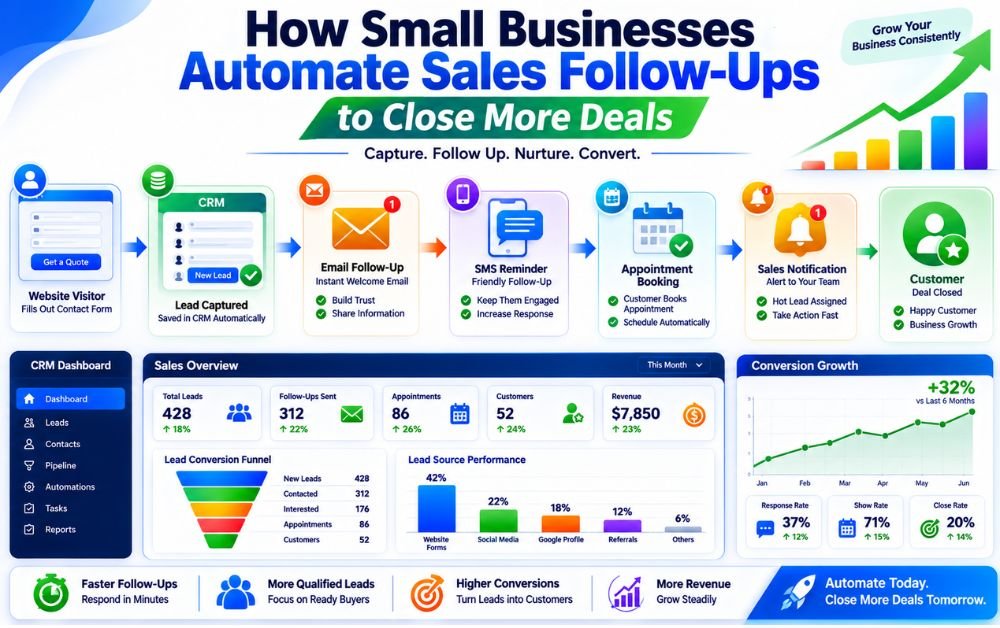
Following up with potential customers is one of the most important parts of the sales process. Unfortunately, many small businesses lose opportunities simply because they fail to respond quickly or forget to follow up consistently.
Manual follow-ups can be difficult to manage, especially when leads come from multiple sources such as websites, social media, landing pages, and phone inquiries. As lead volume increases, keeping track of every conversation becomes even more challenging.
Sales follow-up automation helps solve this problem by automatically sending emails, SMS messages, reminders, and notifications based on customer actions. This ensures every lead receives timely communication without creating additional work for the business owner or sales team.
Automation also improves response times, increases engagement, and helps move prospects through the sales process more efficiently. Instead of chasing leads manually, businesses can focus on building relationships and closing deals.
When implemented correctly, sales follow-up automation creates a consistent customer experience and helps small businesses convert more leads into paying customers while saving valuable time every day.
Sales follow-up automation is the process of automatically contacting leads after they show interest in your business. Instead of manually sending emails, text messages, reminders, or appointment confirmations, software handles these tasks based on predefined rules and customer actions.
For example, when someone fills out a contact form, requests a quote, or books a consultation, the system can instantly send a confirmation message and schedule future follow-ups automatically. This ensures every lead receives consistent communication without requiring constant attention from the business owner or sales team.
Automation also helps businesses stay organized by tracking conversations, reminders, and customer interactions in one place. This reduces the risk of missed opportunities and improves response times.
Businesses using automate lead capture strategies often achieve better results because follow-ups begin immediately after a prospect enters the system. Many small businesses use ActiveCampaign to automate emails, customer journeys, and lead nurturing sequences.
Why Small Businesses Need Automated Follow-Ups
Many small business owners wear multiple hats every day. Between managing customers, operations, marketing, and finances, it becomes difficult to remember every lead that requires a follow-up.
Unfortunately, most prospects do not buy after the first interaction. They often need several touchpoints before making a decision. Without a structured follow-up process, valuable opportunities can easily be forgotten.
Automated follow-ups ensure that every lead receives timely communication regardless of how busy the business becomes. Emails, SMS messages, appointment reminders, and check-ins can all be scheduled automatically to keep prospects engaged.
This creates a better customer experience while improving conversion rates and reducing manual workload. Businesses that already have a sales funnel in place often see even stronger results because leads move through a consistent process from inquiry to purchase.
Many businesses rely on GoHighLevel to combine CRM management, sales pipelines, and automated follow-up workflows within one platform.
Common Follow-Up Challenges for Small Businesses
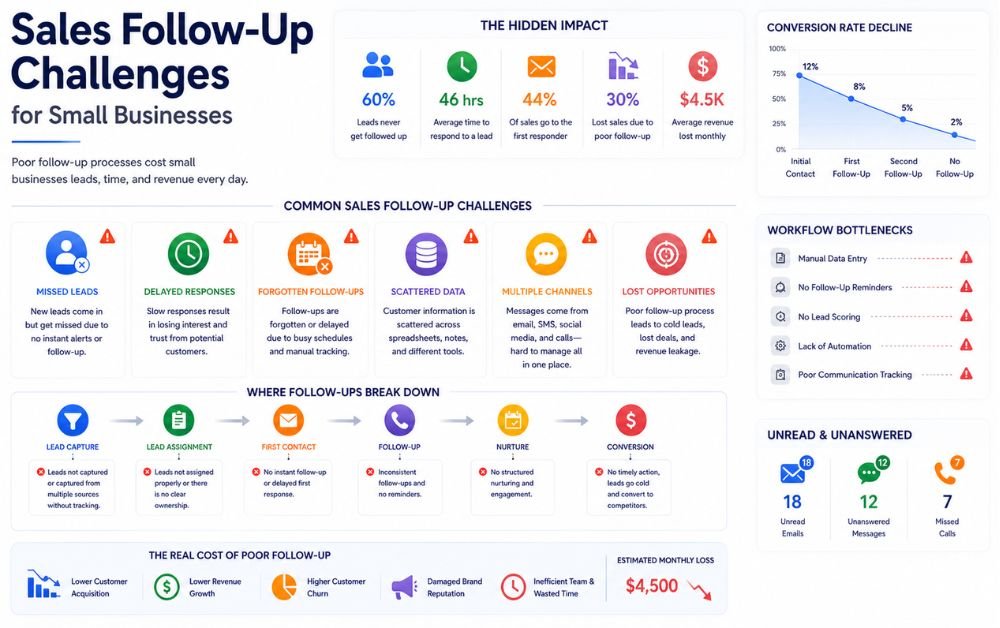
One of the biggest challenges small businesses face is inconsistent communication. Some leads receive immediate responses while others wait days before hearing back. These delays often result in lost sales opportunities.
Another common problem is managing leads from multiple channels. Inquiries may arrive through websites, Facebook, Google Business Profile, email, phone calls, and landing pages. Tracking every conversation manually becomes difficult as lead volume increases.
Businesses also struggle with remembering when to follow up. Prospects may require multiple emails, calls, or reminders before they are ready to buy. Without automation, these tasks are easy to overlook.
Poor lead organization can create additional problems. Businesses that lack a proper CRM often lose track of conversations and customer information.
Companies focused on CRM automation can improve lead visibility, follow-up consistency, and sales performance. Many organizations use HubSpot to centralize customer data and automate follow-up activities.
Benefits of Sales Follow-Up Automation
Sales follow-up automation helps small businesses stay connected with prospects without spending hours on repetitive tasks. Instead of manually sending emails, reminders, and messages, automated systems ensure every lead receives timely communication.
One of the biggest benefits is faster response times. Prospects receive immediate confirmation messages, which improves engagement and creates a positive first impression. Automation also increases consistency by ensuring no lead is forgotten.
Another advantage is improved productivity. Business owners and sales teams can focus on conversations and closing deals instead of managing follow-up schedules. Automated systems also provide better visibility into customer interactions and sales opportunities.
Companies that use marketing automation often experience stronger lead nurturing and higher conversion rates because prospects receive the right message at the right time. Many businesses use ActiveCampaign to automate customer journeys, follow-ups, and engagement campaigns.
How Automated Sales Follow-Ups Work
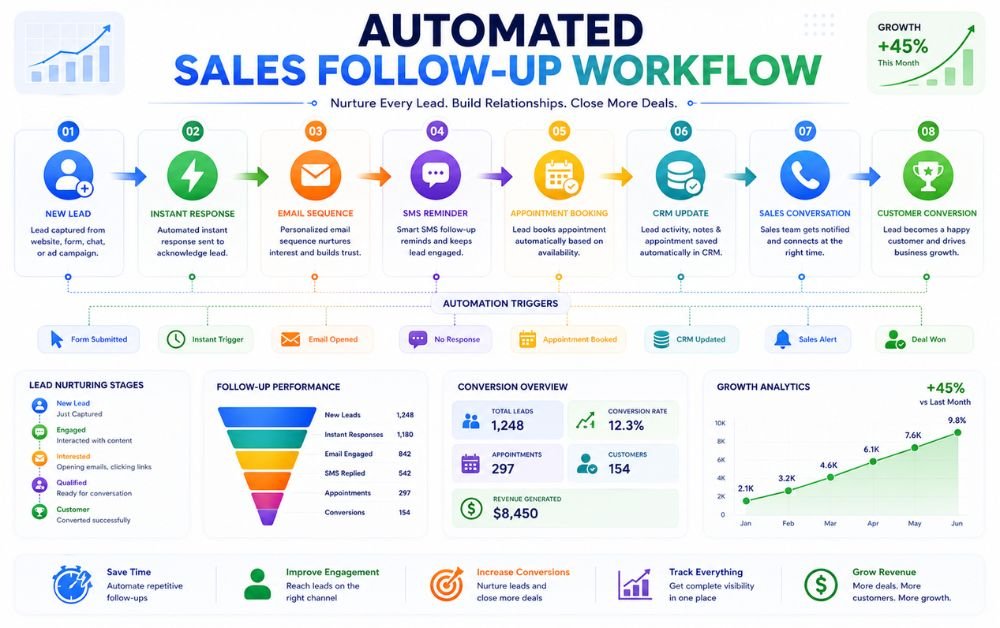
Automated sales follow-ups begin when a prospect takes an action such as filling out a form, requesting a quote, booking an appointment, or downloading a resource. The automation platform immediately records the lead and triggers predefined communication sequences.
The first message is usually sent within minutes to acknowledge the inquiry. Additional emails, SMS messages, reminders, or notifications are then delivered based on the customer’s behavior and engagement.
If a prospect opens emails, clicks links, or schedules a meeting, the system can automatically move them to the next stage of the sales process. Leads who remain inactive can receive re-engagement campaigns without manual intervention.
Businesses using automate lead capture systems often combine lead collection and follow-up automation to create a seamless customer journey. Many organizations use GoHighLevel to manage this entire process from a single platform.
Lead Response Automation
The speed of the first response can significantly impact conversion rates. Prospects who receive immediate communication are more likely to remain engaged than those who wait hours or days for a reply.
Lead response automation ensures every inquiry receives an instant acknowledgment. Whether the lead comes from a website form, landing page, social media advertisement, or contact request, automated systems respond immediately.
These responses can include thank-you messages, appointment scheduling links, requested information, or next-step instructions. This creates a professional experience and reassures prospects that their inquiry has been received.
Businesses that have implemented a sales funnel often use automated responses to move leads into nurturing sequences immediately after their first interaction. Many companies use HubSpot workflows to automate lead responses and improve customer engagement.
Email Follow-Up Automation
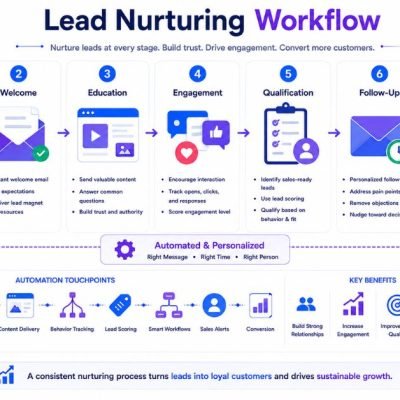
Email remains one of the most effective follow-up channels for small businesses. Automated email sequences allow businesses to stay in contact with prospects while building trust and providing valuable information.
A typical sequence may include welcome emails, educational content, testimonials, case studies, special offers, and appointment reminders. Messages are delivered automatically according to a predefined schedule.
Email automation also allows businesses to personalize communication based on customer behavior. Prospects who engage with emails can receive different content than those who remain inactive.
Companies interested in improving email automation strategies often combine email nurturing with CRM tracking for better visibility into customer engagement. Many businesses use Brevo to automate email campaigns and customer communication.
SMS Follow-Up Automation
SMS automation provides a direct and highly visible communication channel for businesses. Text messages are often opened much faster than emails, making them ideal for reminders, confirmations, and urgent updates.
Businesses commonly use SMS automation for appointment reminders, quote follow-ups, payment notifications, event confirmations, and limited-time promotions. Because messages arrive directly on mobile devices, engagement rates are typically very high.
SMS works best when combined with email and CRM systems. Together, these tools create a multi-channel follow-up process that keeps prospects engaged throughout the sales journey.
Businesses focused on local business marketing automation often use SMS campaigns to improve response rates and customer communication. Many companies rely on Keap to automate both SMS and sales follow-up activities.
Appointment Reminder Automation
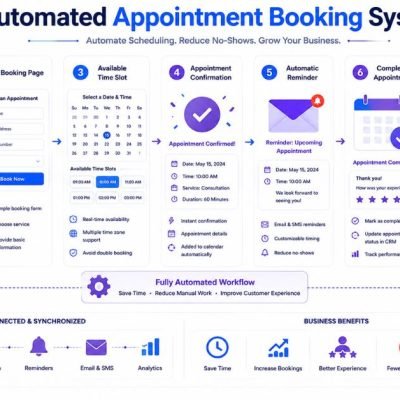
Missed appointments can cost small businesses both time and revenue. Appointment reminder automation helps reduce no-shows by automatically notifying prospects before scheduled meetings, consultations, or service calls.
Most systems send reminders through email, SMS, or both. Messages can be scheduled days, hours, or minutes before an appointment. This ensures customers remember their bookings and have enough time to reschedule if necessary.
Automated reminders also create a more professional customer experience. Instead of manually contacting every prospect, businesses can rely on automation to handle the process consistently.
Companies focused on marketing automation for service businesses often use appointment reminders to improve attendance rates and customer satisfaction. Many businesses use Calendly integrations to automate scheduling, confirmations, and reminder notifications.
CRM-Based Follow-Up Management
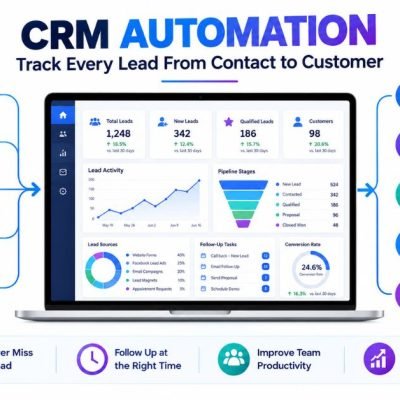
A CRM helps businesses organize customer information and manage follow-up activities from a central location. Every interaction, message, appointment, and sales opportunity can be tracked automatically.
CRM-based follow-up management ensures sales teams always know where a lead is within the customer journey. Automated tasks, reminders, and status updates help prevent leads from being overlooked.
Businesses can also view communication history before contacting a prospect, making conversations more relevant and productive. This improves customer relationships and sales efficiency.
Companies implementing CRM automation often experience better lead management and stronger sales performance. Many organizations use HubSpot to combine CRM functionality with automated follow-up workflows and customer tracking.
Lead Segmentation for Better Follow-Ups
Not every lead has the same needs, interests, or buying intent. Lead segmentation helps businesses group prospects based on characteristics such as location, industry, behavior, service interest, or engagement level.
Once leads are segmented, businesses can deliver more relevant follow-up messages. A prospect requesting a quote may receive different communication than someone downloading an educational resource.
Segmentation improves personalization while increasing engagement and conversion rates. It also prevents businesses from sending the same generic message to every contact.
Companies using affordable marketing automation tools often rely on segmentation to improve targeting and customer communication. Many businesses use ActiveCampaign to automate lead segmentation and personalized marketing campaigns.
Personalizing Automated Follow-Ups
Automation does not have to feel robotic. Modern platforms allow businesses to personalize follow-up messages using customer information, behavior, interests, and previous interactions.
Personalized communication can include a prospect’s name, requested service, appointment details, location, or specific business needs. These small details make messages feel more relevant and engaging.
Businesses can also create different follow-up paths based on customer actions. For example, someone who opens emails may receive different content than someone who has not engaged.
Companies that successfully implement sales follow-up automation often combine personalization with automation to improve trust and customer relationships. Many businesses use Keap to create highly personalized customer journeys and follow-up campaigns.
Re-Engaging Cold Leads Automatically
Not every lead converts immediately. Some prospects become inactive after initial contact, while others simply need more time before making a decision. Re-engagement automation helps businesses reconnect with these cold leads.
Automated campaigns can send educational content, special offers, success stories, industry updates, or appointment invitations designed to renew interest. These messages keep the business visible without requiring manual effort.
Re-engagement workflows can also identify inactive leads and automatically place them into nurturing sequences. This creates additional opportunities for future conversions.
Businesses that use automate lead capture systems often include re-engagement campaigns as part of their long-term follow-up strategy. Many organizations use Brevo to automate customer reactivation and lead nurturing campaigns.
Tracking Follow-Up Performance
Monitoring follow-up performance helps businesses understand which activities generate the best results. Without tracking, it becomes difficult to identify successful campaigns or improve conversion rates.
Important metrics include email open rates, click-through rates, response rates, appointment bookings, SMS engagement, and sales conversions. These numbers reveal how prospects interact with follow-up communications.
Businesses should regularly review performance reports and adjust messaging, timing, and workflows based on actual results. Even small improvements can significantly increase sales outcomes.
Companies interested in improving marketing automation vs CRM strategies often use performance data to optimize customer journeys and follow-up processes. Many businesses use GoHighLevel dashboards to track lead activity, engagement metrics, and conversion performance from a single platform.
Measuring Sales Conversion Rates
Sales conversion rates show how effectively a business turns leads into paying customers. Tracking this metric helps identify strengths and weaknesses within the sales process and highlights opportunities for improvement.
To calculate conversion rates, businesses compare the number of customers acquired against the total number of leads generated. Monitoring this data regularly helps determine whether follow-up systems are producing results.
Businesses should also track conversion rates at different stages of the customer journey. Understanding where prospects drop off makes it easier to improve messaging, follow-up timing, and sales processes.
Companies focused on sales funnel for small business strategies often use conversion tracking to optimize every stage of the funnel. Many businesses use HubSpot reporting tools to measure lead progression, sales performance, and customer acquisition results.
Common Sales Follow-Up Mistakes to Avoid
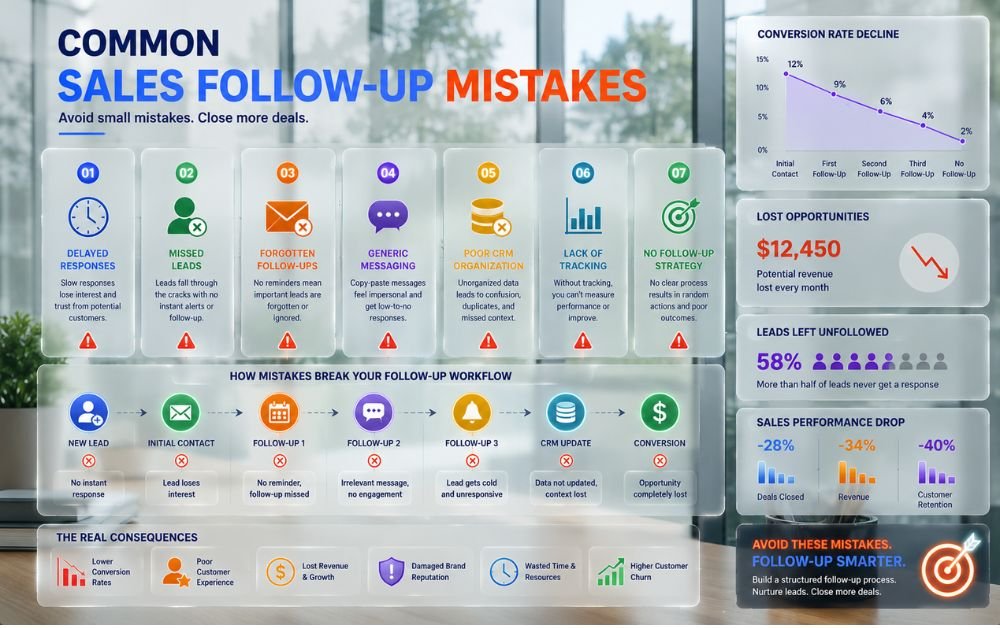
One of the biggest mistakes businesses make is waiting too long to contact new leads. Delayed responses often reduce engagement and allow competitors to capture potential customers first.
Another common problem is inconsistent follow-ups. Many businesses send one message and then stop communicating if they do not receive an immediate response. Most prospects require multiple touchpoints before making a decision.
Sending generic messages can also reduce effectiveness. Customers respond better when communication feels relevant to their needs and interests. Poor lead organization and lack of tracking create additional challenges.
Businesses working on local business marketing automation often improve results by creating structured follow-up systems instead of relying on manual communication. Many organizations use ActiveCampaign to automate and standardize follow-up activities.
Best Practices for Successful Follow-Up Automation
Successful follow-up automation starts with speed and consistency. Businesses should ensure every new lead receives an immediate response and enters a structured nurturing process.
Messages should be personalized whenever possible. Using customer names, interests, and previous interactions helps create a more engaging experience. Combining email, SMS, CRM tracking, and appointment reminders often produces the best results.
Businesses should also review performance metrics regularly and adjust workflows based on real customer behavior. Continuous optimization helps improve engagement and conversion rates over time.
Companies implementing marketing automation software often achieve better results when automation supports human communication rather than replacing it completely. Many businesses use GoHighLevel to manage multi-channel follow-up campaigns and customer engagement from a single platform.
Final Verdict
Sales follow-up automation helps small businesses respond faster, stay organized, and close more deals without increasing workload. By automating emails, SMS messages, appointment reminders, CRM updates, and lead nurturing activities, businesses can create a consistent customer experience and reduce missed opportunities.
The most successful businesses combine automation with personalization to build stronger relationships and improve conversion rates. Whether leads come from websites, social media, referrals, or advertising campaigns, a structured follow-up system ensures every opportunity receives proper attention and increases the likelihood of becoming a paying customer.
FAQs
Sales follow-up automation automatically sends messages, reminders, and notifications to leads based on their actions.
Most prospects need multiple interactions before purchasing, making follow-ups essential for conversions.
A combination of email, SMS, and phone communication typically delivers the strongest results.
Yes. A CRM helps organize leads, track interactions, and automate follow-up activities efficiently.
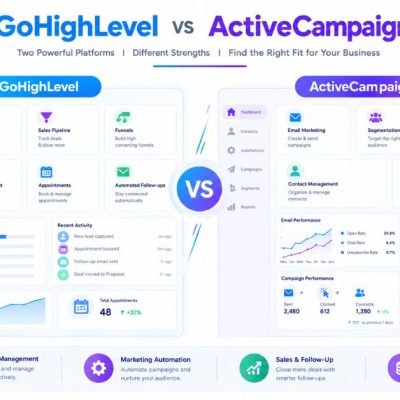
Popular options include GoHighLevel, HubSpot, ActiveCampaign, Keap, and Brevo, depending on business needs and budget.