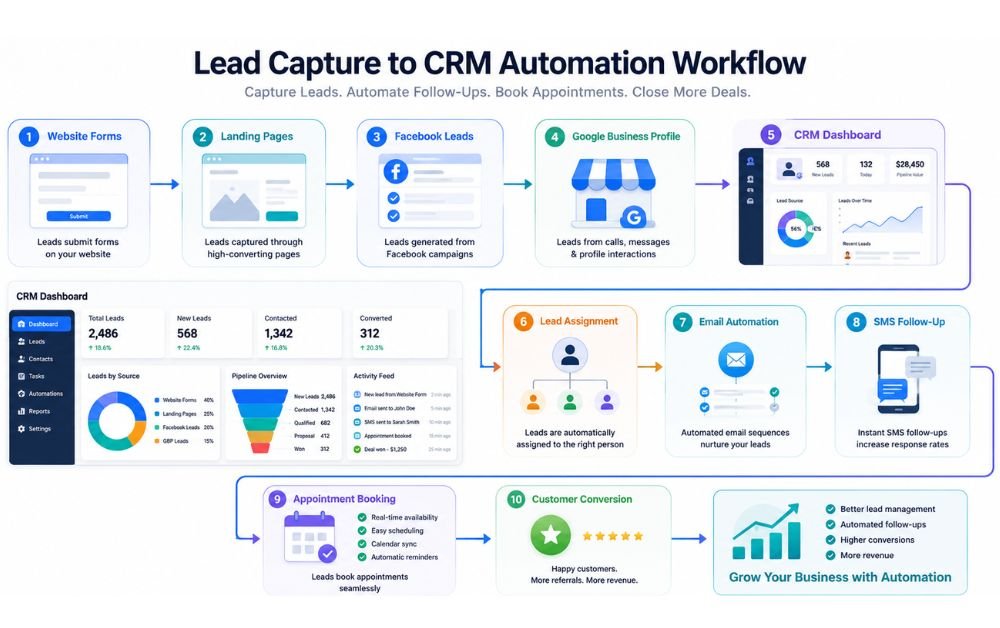
Every new lead represents a potential customer, but many small businesses lose valuable opportunities because leads are not captured, organized, or followed up quickly. Information collected from website forms, landing pages, social media, or online directories often remains scattered across different platforms, making it difficult to respond consistently. As a result, interested prospects may choose competitors who reply faster.
Lead capture to CRM automation solves this problem by automatically collecting lead information and sending it directly into a customer relationship management (CRM) system. Once a lead enters the CRM, businesses can trigger welcome emails, assign leads to sales teams, schedule follow-ups, and track every interaction without manual work. This creates a faster, more organized sales process while reducing the risk of missed opportunities.
In this guide, you’ll learn a practical, step-by-step workflow to build an automated system that captures leads, manages customer information, and improves conversions for your small business.
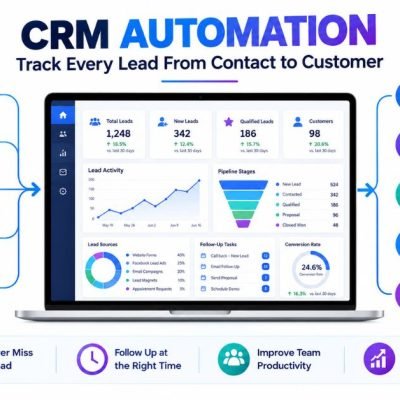
Lead capture to CRM automation is the process of automatically collecting customer information and sending it directly to a CRM without manual data entry. Instead of copying names, phone numbers, or email addresses from different platforms, automation transfers every new lead into one organized system.
Leads can come from website contact forms, landing pages, Facebook Lead Ads, Google Business Profile, live chat, or online booking forms. Once the information reaches the CRM, automated workflows can instantly assign leads, send welcome emails, schedule follow-ups, and notify sales teams.
This automated process reduces human error, improves response times, and ensures no inquiry is overlooked. Businesses can spend less time managing spreadsheets and more time building customer relationships.
For small businesses, Systeme.io provides lead capture forms, CRM features, sales funnels, and automation tools in one platform, making it easier to manage leads from the first interaction through customer conversion.
Why Small Businesses Need an Automated Lead Workflow
Many small businesses receive leads from multiple channels every day, making it difficult to manage them manually. When lead information is scattered across emails, social media, spreadsheets, and messaging apps, delayed responses and missed opportunities become common.
An automated workflow creates a structured process that captures every lead, stores customer information, and starts follow-up activities immediately. Instead of relying on manual tasks, automation keeps the sales process consistent from beginning to end.
Faster responses improve customer experience because potential buyers receive information while their interest is still high. Automation also reduces repetitive work, allowing business owners to focus on serving customers and growing the business.
A well-designed marketing automation strategy connects lead generation with CRM management, email follow-ups, and appointment scheduling, helping businesses increase efficiency while improving lead conversion rates.
Common Lead Management Challenges
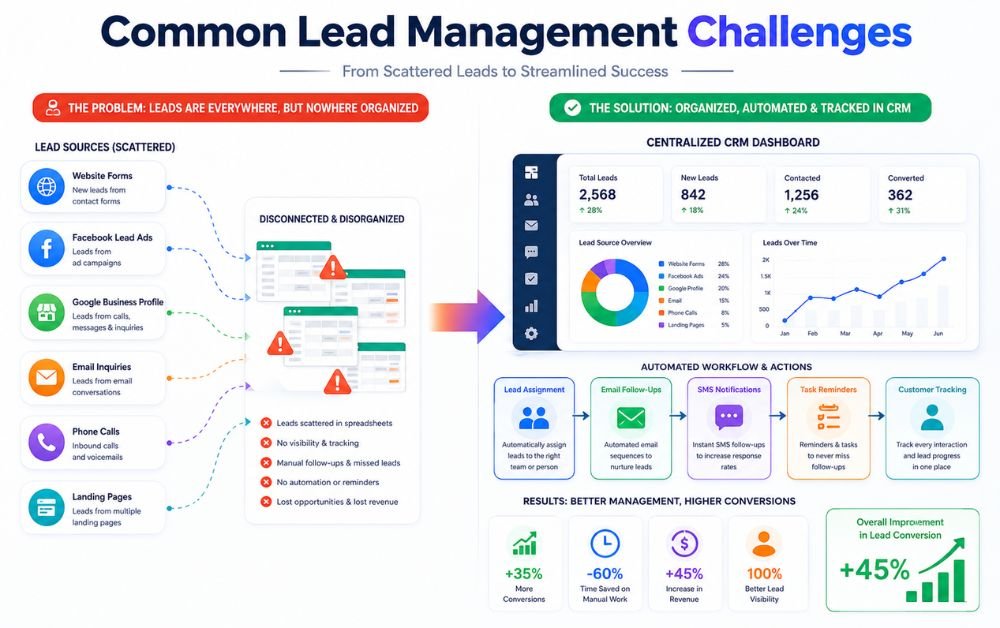
Managing leads manually often creates unnecessary delays and confusion. Customer inquiries may arrive through different platforms, making it difficult to organize information or remember which prospects have already received a response.
Duplicate records, missing contact details, forgotten follow-ups, and inconsistent communication are common problems that reduce conversion rates. As lead volume increases, these challenges become even more difficult to manage without an organized system.
Slow response times also affect customer trust. Many potential customers choose competitors simply because they receive faster replies and clearer communication.
Using CRM automation helps centralize lead information, automate repetitive tasks, and keep every customer interaction organized. Instead of spending valuable time updating spreadsheets or searching through emails, businesses can focus on building stronger relationships and converting more qualified leads into paying customers.
Step 1: Capture Leads from Multiple Channels
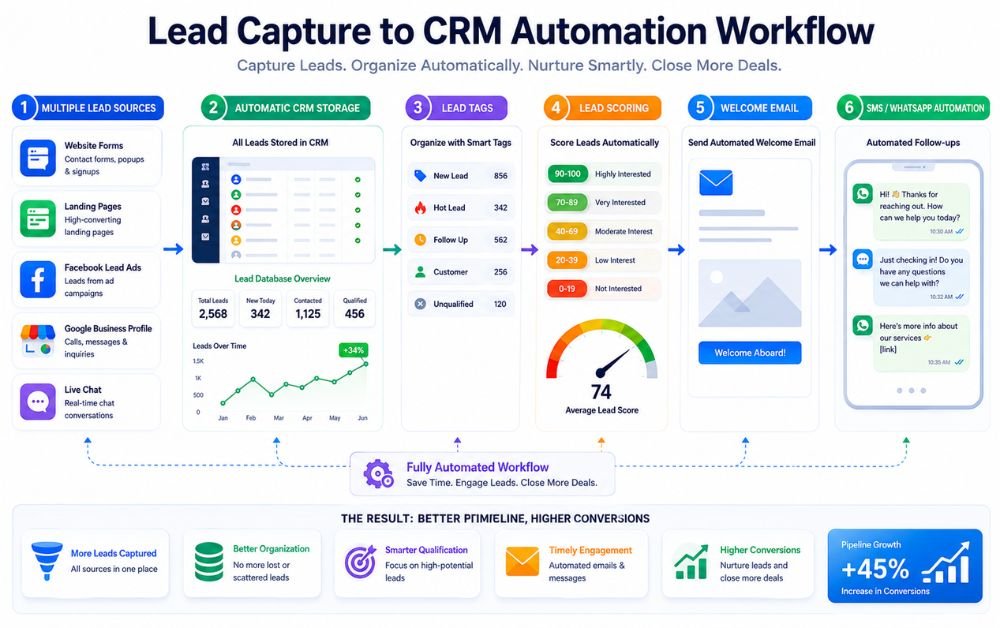
The first step in lead capture to CRM automation is collecting leads from every place where potential customers interact with your business. These sources may include website contact forms, landing pages, Facebook Lead Ads, Google Business Profile, live chat, appointment booking forms, and downloadable resources.
Every lead should enter the same workflow regardless of where it originates. This eliminates the need to manually copy contact details between different platforms and reduces the risk of losing valuable opportunities.
Using multiple lead sources also helps businesses reach customers through their preferred communication channels while keeping all information organized in one system.
Businesses using Systeme.io can connect forms, landing pages, and funnels to automatically collect leads and begin the customer journey without manual intervention.
Step 2: Automatically Store Leads in Your CRM
Once a lead is captured, the information should be transferred directly into your CRM. Automatic storage ensures that every name, email address, phone number, and inquiry is recorded immediately without requiring manual data entry.
A centralized CRM gives businesses a complete view of every lead and makes it easier to track communication history, appointments, and future follow-ups. This organized approach reduces duplicate records and minimizes human error.
Keeping all customer information in one place also improves collaboration because everyone works with the same updated information.
Businesses looking for an affordable all-in-one solution often use Systeme.io because it combines lead capture, contact management, and CRM features within a single platform.
Step 3: Organize and Tag New Leads
Not every lead has the same needs or interests. Organizing contacts into categories helps businesses communicate more effectively and deliver relevant information to each prospect.
New leads can be tagged according to lead source, location, requested service, product interest, or customer type. Proper tagging allows businesses to quickly filter contacts and launch targeted automation workflows.
Organized lead data also simplifies reporting, improves customer management, and helps sales teams prioritize their daily activities. As the number of contacts grows, structured organization becomes even more valuable.
Combining marketing automation with lead tagging makes it easier to send personalized emails, assign follow-up tasks, and create customer journeys that match each lead’s interests.
Step 4: Score and Qualify Leads Automatically
Lead scoring helps identify which prospects are most likely to become customers. Instead of treating every lead the same, businesses can automatically prioritize contacts based on their actions and level of interest.
For example, someone who requests a consultation, opens multiple emails, or visits important pages may receive a higher score than someone who only submits a basic inquiry. This allows sales teams to focus first on the most qualified opportunities.
Automatic qualification also reduces time spent contacting leads who are not yet ready to buy. Resources can be directed toward prospects with the highest conversion potential.
Using CRM automation, businesses can automatically update lead scores as customer behavior changes, making sales and follow-up activities more efficient.
Step 5: Send Instant Welcome Emails
A welcome email should be sent immediately after a lead submits a form or requests information. Quick communication confirms that the inquiry has been received while creating a positive first impression.
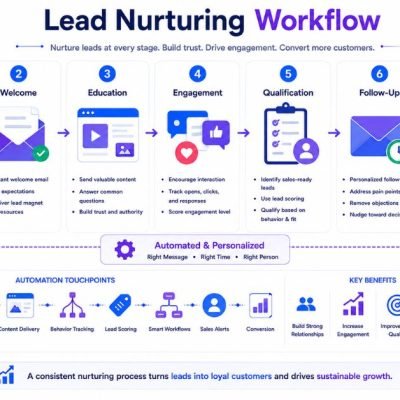
The first email should thank the lead, explain what will happen next, and provide helpful information related to their request. This keeps prospects engaged while they wait for additional communication.
Welcome emails also build trust by showing that the business responds promptly and values customer inquiries. They often achieve high open rates because subscribers expect immediate confirmation after signing up.
Businesses that automate email campaigns can trigger welcome emails automatically, ensuring every new lead receives consistent communication without requiring manual effort from the sales team.
Step 6: Trigger Automated SMS or WhatsApp Messages
Email is valuable, but many customers respond more quickly to text-based communication. Automated SMS or WhatsApp messages provide instant confirmations, appointment reminders, follow-up notifications, and important updates directly on a customer’s mobile device.
Messages should be short, clear, and relevant. Sending timely notifications improves customer experience while reducing missed appointments and delayed responses.
Automation ensures every lead receives consistent communication regardless of when they submit an inquiry. It also saves time by removing the need for manual messaging throughout the day.
Businesses that already use lead capture workflows often combine email with SMS or WhatsApp automation to improve response rates and keep prospects engaged across multiple communication channels.
Step 7: Assign Leads to the Right Sales Team
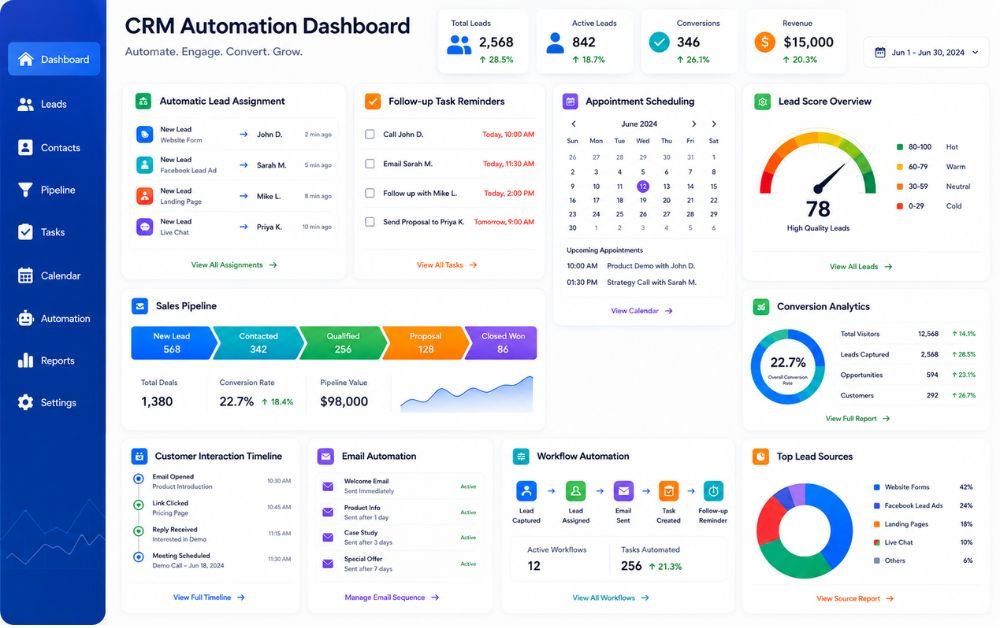
Not every lead should be handled by the same person. As businesses grow, assigning leads manually becomes slower and increases the chance of missed opportunities. An automated assignment process ensures every inquiry reaches the right salesperson immediately.
Leads can be assigned based on location, product interest, service category, or team availability. This reduces response time and helps sales representatives focus on prospects that match their expertise.
Automatic lead assignment also creates accountability because every inquiry has a clear owner from the beginning. Managers can easily monitor progress without manually distributing leads throughout the day.
Businesses using CRM automation can create assignment rules that automatically route qualified leads to the appropriate sales representative, improving efficiency and customer experience.
Step 8: Schedule Follow-Up Tasks Automatically
Following up at the right time is one of the most important parts of converting leads into customers. Automation ensures that no follow-up task is forgotten, even when businesses receive a large number of inquiries.
Tasks can be created automatically after a lead submits a form, schedules a consultation, or requests additional information. Sales representatives receive reminders for phone calls, emails, demonstrations, or other important activities without relying on manual notes.
Automatic scheduling creates a consistent sales process and reduces delays that often cause businesses to lose potential customers.
Businesses that automate email campaigns often combine follow-up tasks with email sequences, ensuring leads receive timely communication while sales teams know exactly when personal contact is required.
Step 9: Book Meetings Without Manual Work
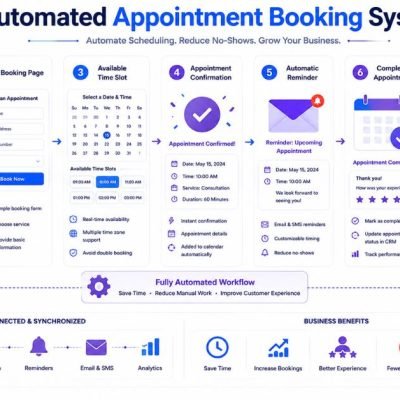
Scheduling meetings manually often involves multiple emails and phone calls to find a suitable time. Automation simplifies this process by allowing prospects to choose available appointment slots directly from an online booking calendar.
Once a meeting is scheduled, confirmation emails, calendar invitations, and reminder messages can be sent automatically. This reduces scheduling errors and minimizes missed appointments.
Automated booking also provides a better customer experience because prospects can arrange meetings whenever it is convenient for them, even outside normal business hours.
Businesses using Systeme.io can connect landing pages, forms, and appointment scheduling into one workflow, making it easier for new leads to book meetings immediately after submitting their information.
Step 10: Track Every Customer Interaction
Every interaction with a lead provides valuable information that can improve future communication. Tracking emails, phone calls, meetings, website visits, and follow-up activities helps businesses understand where each prospect is in the sales process.
Keeping this information inside a CRM eliminates confusion and ensures every team member has access to the same customer history. This creates more personalized conversations and prevents duplicate communication.
Customer interaction tracking also helps identify common questions, buying patterns, and areas where prospects need additional support before making a decision.
A well-organized lead capture workflow records every customer touchpoint automatically, giving businesses a complete picture of the buyer’s journey from the first inquiry to the final conversion.
Step 11: Measure Lead Conversion Performance
Measuring performance helps businesses understand whether their automation workflow is producing real business results. Without accurate reporting, it becomes difficult to identify strengths, weaknesses, and opportunities for improvement.
Important metrics include total leads captured, response time, qualified leads, appointment bookings, sales conversions, and customer acquisition rates. Monitoring these numbers regularly helps businesses make informed decisions based on real data.
Performance reports also reveal which marketing channels generate the highest-quality leads. This allows businesses to invest more resources in strategies that consistently produce better results.
Businesses that use marketing automation should review conversion reports regularly to improve lead quality, optimize follow-up processes, and increase overall return on marketing investment.
Step 12: Optimize Your Automation Workflow
Automation is not something you build once and never review. As customer behavior, marketing strategies, and business goals change, workflows should also be updated to maintain strong performance.
Regularly reviewing automation rules helps identify delays, unnecessary steps, broken workflows, or communication gaps that may reduce conversions. Small improvements can significantly increase efficiency over time.
Testing different email sequences, follow-up timing, lead qualification rules, and customer journeys allows businesses to continuously improve their sales process. Monitoring customer feedback also provides valuable insights for future optimization.
Businesses using Systeme.io can easily update automation workflows, funnels, and email sequences as their business grows, making it simple to improve lead management while delivering a better customer experience.
Common Lead Capture to CRM Automation Mistakes
One of the biggest mistakes businesses make is collecting leads without having an automated follow-up process. A fast response is important because delays can reduce interest and increase the chances of losing potential customers.
Another common problem is storing lead information in multiple places instead of keeping everything inside one CRM. This often creates duplicate records, missed follow-ups, and inconsistent communication. Poor lead tagging and qualification can also make it difficult to identify high-value prospects.
Many businesses create automation workflows but never review or update them. As customer behavior changes, workflows should be tested regularly to ensure emails, SMS messages, and follow-up tasks continue working as expected.
Businesses using CRM automation should also avoid overcomplicating workflows. Simple, organized automation is usually easier to manage, produces more consistent results, and provides a better experience for both customers and sales teams.
Best Practices for Building a Reliable Workflow
A reliable automation workflow begins with a clear process that moves every lead from capture to conversion without unnecessary manual work. Each stage should have a specific purpose, including lead capture, CRM storage, qualification, follow-up, appointment booking, and performance tracking.
Automation should be reviewed regularly to identify delays, outdated messages, or unnecessary steps that reduce efficiency. Testing different workflows helps businesses improve response times and customer engagement over time.
Keeping customer information organized inside a single system also improves communication and prevents duplicate records. Simple workflows are often easier to maintain and scale than overly complex automation systems.
Businesses using Systeme.io can manage forms, CRM, email automation, funnels, and workflows from one platform, making it easier to build a reliable automation process while reducing the need for multiple marketing tools.
Final Verdict
Lead capture to CRM automation helps small businesses capture every opportunity while reducing repetitive manual work. From collecting leads and organizing customer information to sending follow-ups and tracking conversions, automation creates a faster and more consistent sales process.
Businesses that invest in automation respond more quickly, improve customer experiences, and reduce the risk of losing qualified leads. By building a simple workflow and optimizing it over time, small businesses can increase productivity, strengthen customer relationships, and convert more prospects into long-term customers without adding unnecessary complexity.
FAQs
Lead capture to CRM automation automatically collects lead information from forms, landing pages, ads, and other sources, then stores it inside a CRM where follow-ups and workflows begin automatically.
It reduces manual work, improves response times, organizes customer information, and helps businesses follow up consistently with every lead.
Yes. Modern platforms such as Systeme.io provide visual automation tools that allow small businesses to build workflows without advanced coding skills.
Website contact forms, landing pages, Facebook Lead Ads, Google Business Profile, appointment booking forms, and live chat are among the most effective lead sources.
Review your workflow at least once every month. Regular testing and performance analysis help identify bottlenecks, improve response times, and increase lead conversion rates as your business grows.