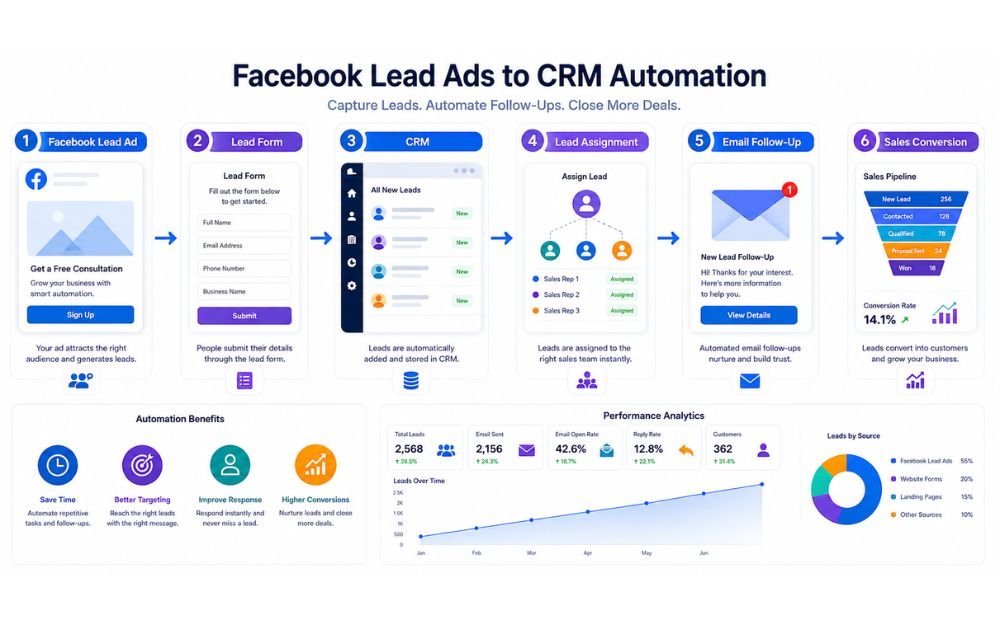
Facebook can generate a steady stream of potential customers, but collecting leads is only the first part of the process. The bigger challenge is making sure every new lead is captured, organized, and followed up with quickly. When leads remain inside Facebook or are manually copied into spreadsheets, businesses can easily miss inquiries or respond too late.
Facebook Lead Ads CRM Integration connects Facebook Lead Ads with your CRM so new contact information can move automatically into your lead management system. Once a lead enters the CRM, you can organize the contact, assign it to the right team member, send an immediate response, and start a follow-up sequence.
This workflow reduces repetitive data entry and creates a more consistent sales process. Instead of checking Facebook manually throughout the day, your team can focus on qualified prospects while automation handles the routine work behind the scenes.
Facebook Lead Ads are advertising campaigns designed to collect contact information directly from people interested in a business. Instead of sending users to a separate website, the ad can open a pre-filled form where they can submit details such as their name, email address, phone number, location, or information related to their needs.
This makes the signup process faster because users do not have to leave the Facebook environment to complete a form. Businesses can use these ads to promote consultations, free resources, product information, special offers, or other lead-generating opportunities.
The quality of the form matters because asking for too much information can discourage people from submitting it. A simple form with relevant questions usually creates a smoother experience.
Once someone submits the form, the next priority is moving that information into a CRM so the business can respond quickly and continue the customer journey.
Why Connect Facebook Lead Ads to Your CRM?
Connecting Facebook Lead Ads to a CRM removes the need to manually download, copy, and organize new contacts. As soon as someone submits a lead form, their information can be transferred into the CRM and placed into the appropriate workflow.
This creates a faster response process. A new lead can automatically receive a confirmation email while the sales team receives a notification to make personal contact. Leads can also be tagged according to the campaign, form, location, or service they requested.
A CRM connection also makes it easier to track what happens after the initial Facebook interaction. Businesses can see whether leads were contacted, qualified, booked for appointments, or converted into customers.
For small businesses, this type of automation reduces administrative work and helps prevent valuable leads from being forgotten. It also creates a more organized process for measuring which Facebook campaigns are producing genuine sales opportunities.
Common Problems With Manual Facebook Lead Management
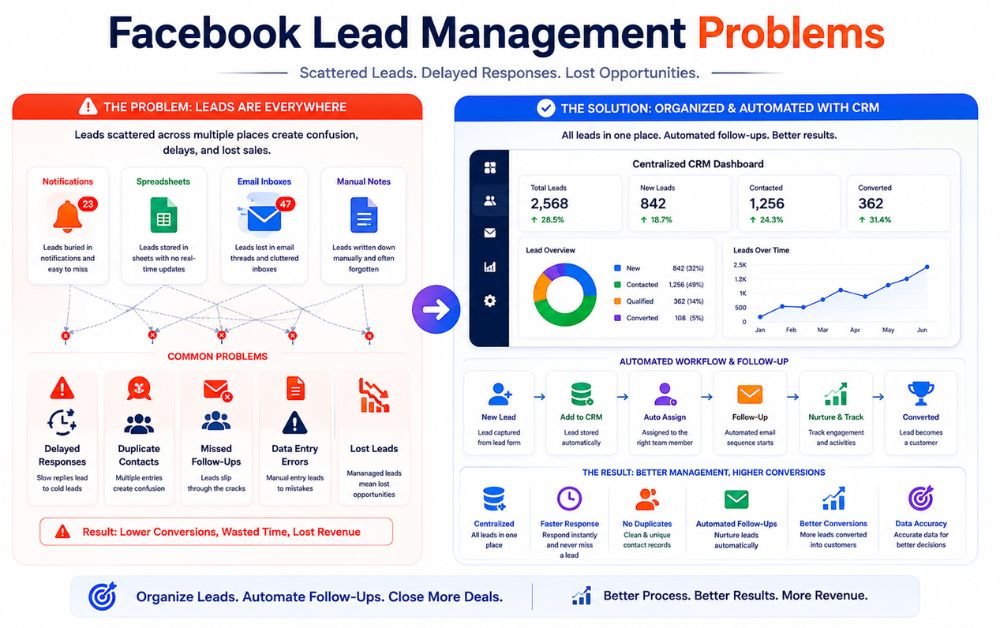
Managing Facebook leads manually can create several problems as lead volume increases. A common issue is delayed follow-up because someone has to check for new submissions, download the information, and enter each contact into another system.
Manual data entry can also create spelling mistakes, duplicate records, and missing information. When leads are stored in spreadsheets or separate files, sales teams may struggle to see whether another employee has already contacted a prospect.
Another problem is inconsistent follow-up. Some leads may receive a response immediately while others are forgotten for hours or even days. This can reduce the chance of converting interested prospects.
Businesses may also find it difficult to measure the complete customer journey when Facebook leads are not connected to their CRM. Without centralized tracking, understanding which campaigns generate qualified leads and actual customers becomes much harder.
How Facebook Lead Ads to CRM Automation Works
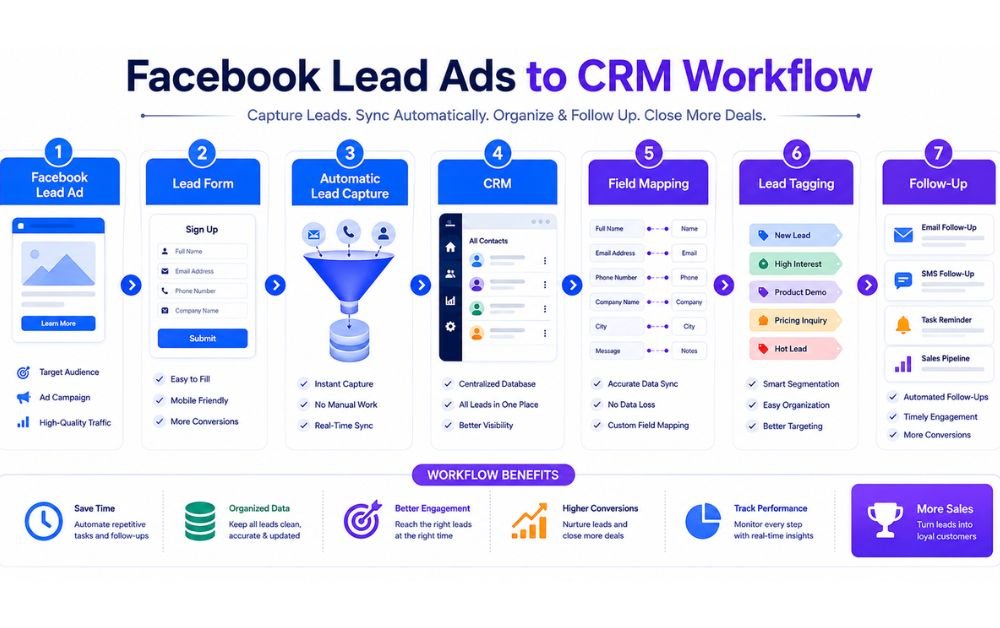
Facebook Lead Ads to CRM automation creates a simple path from a new inquiry to organized customer management. When someone submits a Facebook lead form, their information can automatically move into a CRM instead of being downloaded and entered manually.
The workflow typically starts by collecting basic contact details such as name, email address, phone number, and phone number. The CRM then stores the information, applies relevant tags, and can trigger notifications or follow-up actions.
This process helps businesses respond faster while keeping lead information organized in one place. It also makes it easier to track where each prospect came from and what happens after the initial inquiry.
For businesses building a complete Lead Capture to CRM Automation process, connecting Facebook leads is an important step because it reduces manual data entry and creates a more consistent path from lead generation to sales follow-up.
Step 1: Create Your Facebook Lead Ad
The first step is creating a Facebook Lead Ad that attracts the right audience and gives them a clear reason to submit their information. Start with a specific offer that matches the needs of your target customers, such as a free consultation, quote, guide, discount, or product demonstration.
Your ad copy should explain the benefit quickly and use a clear call to action. Avoid asking people to provide unnecessary information because longer forms can create more friction.
The audience you select also matters. Target people who are likely to need your product or service rather than simply trying to generate the highest possible number of submissions.
Before launching the campaign, check the headline, description, creative, audience, budget, and lead form settings. A well-structured campaign gives your CRM automation system better-quality leads to work with later.
If your overall strategy includes automate lead capture, Facebook Lead Ads can become one of several channels feeding prospects into the same follow-up system.
Step 2: Create a High-Converting Lead Form
After creating the ad, build a lead form that makes submitting information simple. The form should collect only the details your sales or marketing process actually needs.
Basic fields may include name, email address, phone number, and a relevant qualification question. For example, a service business could ask what type of service the prospect needs or when they expect to purchase.
Use clear wording so visitors understand why they are providing their information. Your form should also match the promise made in the advertisement. If the ad offers a consultation, the form should make the next step obvious.
Avoid adding too many questions unless they are necessary for lead qualification. A shorter form can reduce friction, while carefully selected questions can help your team understand the prospect before making contact.
After submission, make sure the form sends the correct information to the next stage of your workflow so your automate lead capture process does not stop after collecting the contact details.
Step 3: Connect Facebook Lead Ads to Your CRM
Once your Facebook lead form is ready, the next step is connecting it to your CRM. The exact setup depends on the CRM and automation tools you use, but the basic process is similar.
You create a connection between your Facebook lead form and the CRM, select the correct advertising account and form, and then choose where new contacts should be stored.
The important part is testing the connection before sending significant traffic to the campaign. Submit a test lead and confirm that the contact appears correctly inside the CRM.
Check whether the name, email, phone number, campaign information, and other relevant details have transferred properly. Also verify that the correct workflow or notification starts after the lead arrives.
A well-configured CRM automation system can then handle tasks such as tagging, lead assignment, notifications, and follow-up without requiring someone to manually transfer every new contact.
Step 4: Map Facebook Lead Fields to CRM Fields
Field mapping determines where each piece of information from your Facebook lead form should appear inside the CRM. This step may seem technical, but it is essential for keeping customer records accurate.
For example, the Facebook first-name field should connect to the CRM first-name field, while the email field should connect to the correct email field. The same principle applies to phone numbers, locations, service interests, and qualification questions.
Before activating the workflow, review every field carefully. Incorrect mapping can place information in the wrong location or leave important CRM fields empty.
It is also useful to keep your field structure simple. Only create custom fields when the information will actually be used for segmentation, qualification, reporting, or follow-up.
Accurate field mapping makes later automation much easier because your CRM receives structured information that can be used to trigger the appropriate actions.
Step 5: Automatically Add and Tag New Leads
After the connection and field mapping are complete, configure the CRM to automatically create a contact whenever a new Facebook lead submits the form. This removes the need for manual data entry and helps ensure that every inquiry enters your system.
Tags can then organize contacts based on useful information such as campaign, location, service interest, or lead source. For example, a business running separate campaigns for different services could use tags to distinguish between those audiences.
These tags can later trigger different workflows. A prospect interested in one service might receive different emails or follow-up tasks from someone interested in another.
Keep your tagging system consistent and avoid creating unnecessary tags that make your CRM difficult to manage. A small set of meaningful tags is usually easier to maintain.
This creates a stronger Lead Capture to CRM Automation workflow because every new contact can be automatically stored, categorized, and prepared for the next stage of the customer journey.
Step 6: Assign Leads to the Right Sales Team
Once a Facebook lead enters your CRM, the next step is deciding who should handle it. Automatic lead assignment can route each prospect to the appropriate salesperson based on location, service interest, lead score, or other information collected through the form.
For example, a lead requesting a specific service can be assigned directly to the salesperson responsible for that service. Leads from different regions can also be distributed to local representatives.
This prevents new inquiries from sitting unassigned inside the CRM. It also creates clearer responsibility because each salesperson knows which prospects they need to contact.
For small businesses, automated assignment becomes especially useful when lead volume increases. Instead of manually checking new contacts and deciding who should handle them, the workflow can make the decision automatically according to predefined rules.
Step 7: Trigger an Instant Lead Notification
Speed matters when someone has just expressed interest in your business. After a Facebook lead enters the CRM, an automatic notification can alert the appropriate salesperson immediately.
The notification might include the prospect’s name, contact details, service interest, lead source, and any qualification information submitted through the form. This gives the salesperson useful context before making contact.
Notifications can be delivered through email, CRM alerts, or other communication channels supported by your workflow. The important goal is to make sure new leads do not remain unnoticed.
An instant alert also works well with automate sales follow-ups, because the sales team can combine immediate personal outreach with scheduled automated communication.
Before activating the workflow, test the notification carefully. Make sure the correct person receives it and that the information displayed is accurate and useful for taking the next action.
Step 8: Send an Automated Welcome Email
After a prospect submits a Facebook lead form, sending an immediate welcome email can confirm that their information was received. This creates a professional first impression and reassures the prospect that the business has received their request.
The message should be simple and relevant to the reason the person submitted the form. It can thank them for their interest, explain what happens next, and provide useful information related to their request.
Avoid making the first email overly promotional. The goal is to acknowledge the inquiry and establish a clear next step.
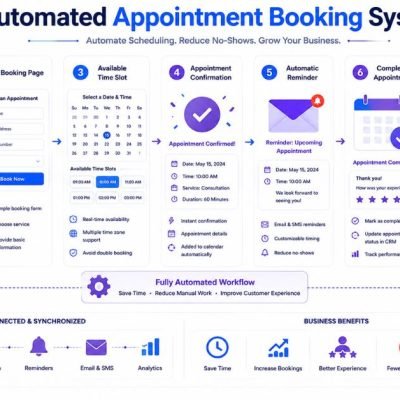
For example, if the lead requested a consultation, the email could explain when someone from the team will contact them or provide an appointment option.
A well-designed automated email workflow can continue communicating with the prospect while the sales team prepares for personal follow-up. This helps maintain engagement without requiring someone to manually send every initial response.
Step 9: Start Automated Follow-Up Sequences
Not every Facebook lead will respond to the first message. An automated follow-up sequence keeps communication moving without requiring salespeople to remember every contact manually.
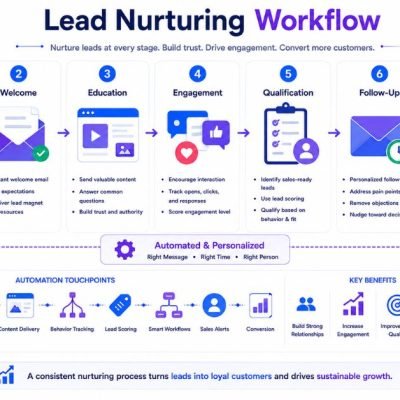
A simple sequence might begin with a welcome email, followed by useful information, a reminder, and a relevant call to action. The timing should depend on the buying process and the type of offer being promoted.
The content should provide value rather than repeatedly asking the prospect to buy. Different messages can address common questions, explain benefits, share useful resources, or encourage the prospect to take the next step.
Automation can also stop the sequence when a lead replies, books an appointment, or becomes a customer. This prevents prospects from receiving unnecessary messages after they have already moved forward.
When properly configured, automated email campaigns can support the sales process while allowing your team to focus more attention on leads who are ready for direct conversations.
Step 10: Qualify and Score Facebook Leads
Not every Facebook lead has the same level of buying intent. Lead qualification and scoring help businesses identify which prospects deserve immediate attention.
A CRM can assign scores based on information such as service interest, location, company size, budget, form responses, email engagement, or other relevant actions. Higher scores can indicate stronger buying intent, while lower scores may require additional nurturing.
The scoring rules should match your actual sales process. Adding points for actions that have little relationship to purchase intent can make the system less useful.
Qualification can also help separate leads that are ready for a sales conversation from those who need more information first. This allows sales teams to prioritize their time more effectively.
As your workflow collects more data, review the scoring criteria regularly. Adjusting the rules based on actual conversion results can make the qualification process more accurate over time.
Step 11: Track Lead Activity Inside Your CRM
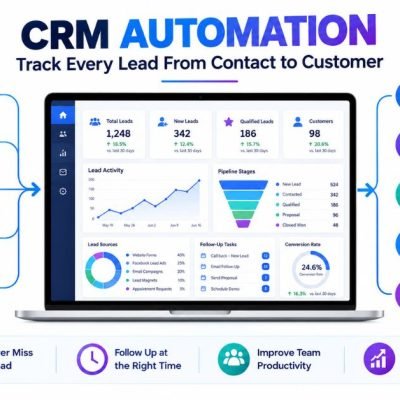
Once Facebook leads are inside your CRM, tracking their activity provides a clearer view of the customer journey. Instead of seeing only the original form submission, your team can monitor important interactions that happen afterward.
Depending on the system, activity may include emails, calls, follow-up tasks, appointment bookings, status changes, and other customer interactions. This information helps salespeople understand where each prospect currently stands.
Tracking also makes it easier to identify leads that need attention. For example, a prospect who has received several messages but has not responded may require a different approach from someone who recently requested an appointment.
Regular activity tracking can also improve reporting. Businesses can compare lead sources, follow-up activity, qualification results, and eventual conversions to understand what is working.
A centralized CRM record gives the sales team a consistent source of information and reduces the risk of important customer interactions being lost across spreadsheets, inboxes, or separate tools.
Step 12: Measure Facebook Lead Conversion Performance
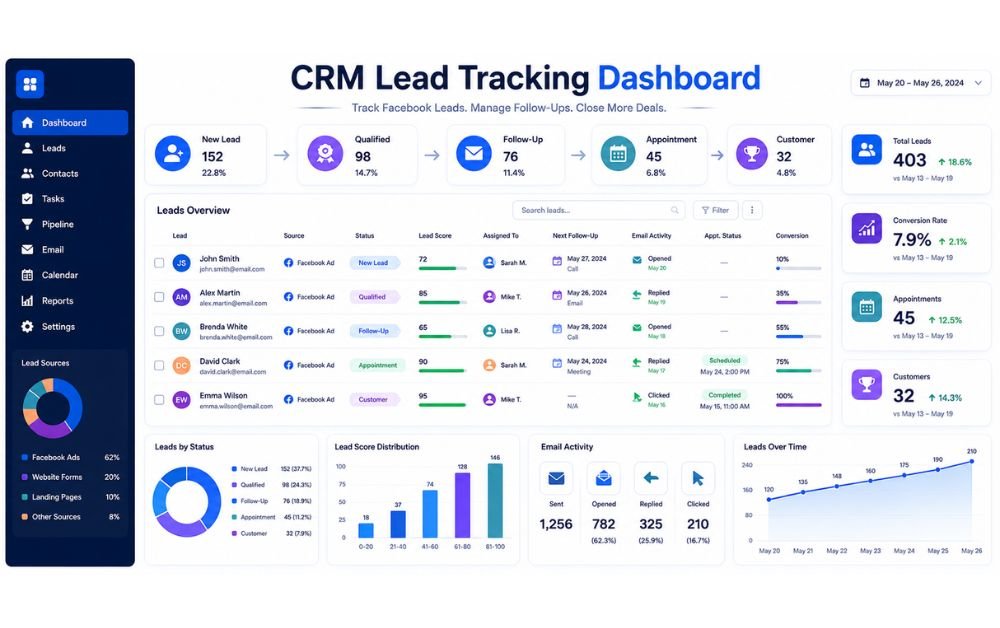
Tracking Facebook lead performance helps you understand whether your campaigns are generating real business opportunities rather than simply collecting contact details. Start by monitoring the number of leads generated, cost per lead, qualified leads, appointments, and customers.
The most important measurement is what happens after the lead enters your CRM. A campaign may generate many inexpensive leads but produce very few sales. Another campaign may generate fewer leads but deliver significantly better customers.
Use your CRM to follow each lead from the original Facebook campaign through qualification, follow-up, appointment, and conversion. Comparing these stages helps identify where prospects are being lost.
You can also compare different campaigns, audiences, and forms to determine which sources produce stronger results. Regular performance reviews allow you to adjust targeting, messaging, follow-up sequences, and qualification rules based on actual conversion data.
Facebook Lead Ads CRM Automation Tools
The right tools depend on your CRM, budget, lead volume, and automation requirements. A basic setup may include Facebook Lead Ads, a CRM, and an automation connection that transfers new contacts between the two systems.
For businesses that need broader automation, an all-in-one platform can combine lead capture, CRM management, email communication, funnels, and workflow automation. Systeme.io can be useful when you want several of these functions managed from one platform.
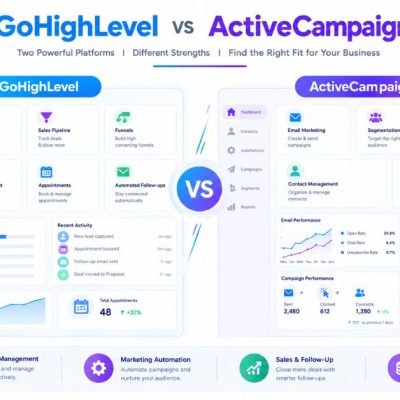
Businesses with more advanced CRM requirements may consider platforms such as HubSpot, GoHighLevel, ActiveCampaign, or other CRM and automation systems. The best choice depends on the complexity of your sales process rather than simply the number of features available.
Before choosing a platform, check whether it supports the Facebook lead connection you need, field mapping, contact organization, notifications, follow-up workflows, and performance tracking. Keeping the technology simple can make the entire automation process easier to maintain.
Common Facebook Lead Ads CRM Mistakes to Avoid
One common mistake is connecting Facebook Lead Ads to a CRM without testing the complete workflow. A connection may appear active while fields, tags, notifications, or follow-up actions are configured incorrectly.
Another problem is collecting too much information through the lead form. Long forms can create unnecessary friction and may reduce the number of people willing to submit their details.
Poor lead organization can also create problems. Without clear tags, statuses, or assignment rules, sales teams may struggle to identify which prospects require immediate attention.
Businesses should also avoid creating complicated automation before understanding their actual sales process. Too many conditions and unnecessary steps can make workflows difficult to monitor and troubleshoot.
Finally, do not measure success only by the number of Facebook leads generated. Focus on qualified leads, appointments, sales opportunities, and customers. The goal of Facebook Lead Ads CRM Integration is not simply to collect more contacts; it is to manage and convert those contacts more effectively.
Best Practices for Facebook Lead Ads CRM Automation
Start with a simple workflow that clearly defines what should happen when a new Facebook lead submits a form. Capture the contact, store the information in your CRM, apply useful tags, assign the lead, and trigger the appropriate follow-up.
Keep your lead form focused on information that will actually help your sales process. Accurate field mapping is equally important because incorrect data can affect segmentation, notifications, and follow-up automation.
Test every stage before launching the campaign at scale. Submit test leads and confirm that the CRM receives the correct information and that every automated action happens as expected.
Review your conversion data regularly and improve the workflow based on actual results. If certain leads convert better, examine what makes those campaigns, audiences, or forms different.
Most importantly, combine automation with human communication. Automation should handle repetitive tasks while salespeople focus on conversations, objections, relationships, and closing opportunities.
Final Verdict
Facebook Lead Ads CRM Integration gives small businesses a practical way to turn Facebook inquiries into organized sales opportunities. Instead of manually transferring contact information, businesses can automatically capture leads, map their data, assign contacts, send notifications, start follow-ups, and track activity inside their CRM.
The biggest benefit is consistency. Every new lead can enter the same structured process while your sales team focuses on prospects that need personal attention.
Start with a simple workflow, test every connection, monitor conversion performance, and improve the process over time. When automation supports the right sales strategy, Facebook leads can move more efficiently from initial interest to customer.
FAQs
Yes. Facebook Lead Ads can be connected to compatible CRM and automation systems so submitted lead information can be transferred automatically instead of being entered manually.
Depending on your form and CRM, information can include names, email addresses, phone numbers, locations, answers to custom questions, and other lead details.
Fast follow-up helps businesses respond while the prospect's interest is still fresh. Automation can send an immediate confirmation while notifying the appropriate salesperson.
Yes. Assignment rules can distribute leads based on factors such as location, service interest, lead score, or other information available in the CRM.
Track more than lead volume. Monitor qualified leads, appointments, follow-up activity, conversion rates, customers, and the overall cost of acquiring those customers. These metrics provide a clearer picture of whether the workflow is producing meaningful business results.