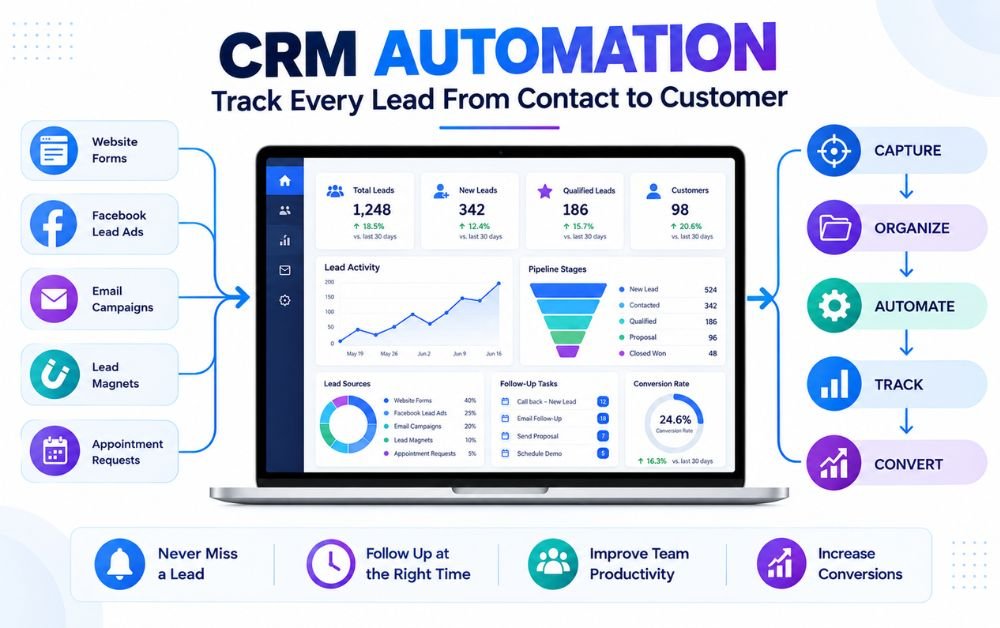
CRM AUTOMATION
Getting leads is only the beginning. The bigger challenge is knowing where every lead is, what they have done, and what should happen next. When lead information is spread across spreadsheets, emails, forms, and different marketing platforms, it becomes easy to miss follow-ups or forget promising prospects.
This is where CRM Automation can make lead tracking much easier. Instead of relying on someone to manually update records, assign leads, create reminders, and check every interaction, automated workflows can handle many of these repetitive tasks.
A properly organized CRM can show when a lead entered your system, where they came from, which messages they interacted with, whether they are becoming more interested, and when they may need personal attention.
In this guide, you will learn how to build a practical lead-tracking process using CRM automation—from capturing a new lead to monitoring their activity, identifying qualified prospects, following up at the right time, and finally tracking the conversion.
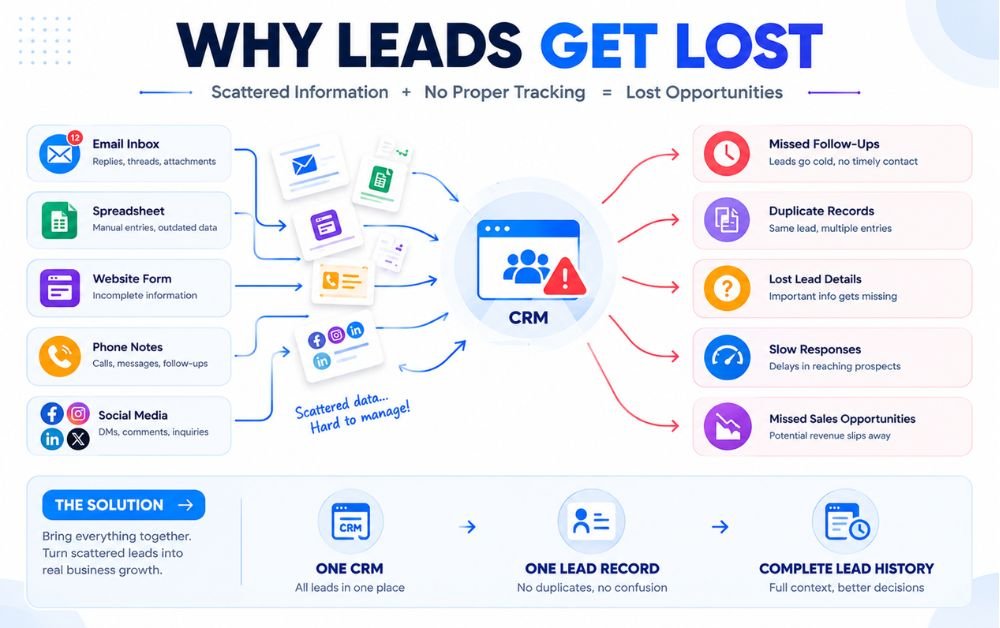
Getting more leads sounds like a good problem to have, but tracking them can quickly become difficult when the process is mostly manual. A few inquiries can be managed through email or a spreadsheet, but things become messy as more people enter the sales process.
Some leads may be contacted immediately while others sit untouched for days. Important details can also get scattered across forms, inboxes, spreadsheets, and notes. As a result, it becomes harder to remember who was contacted, what they were interested in, and what should happen next.
This is where lead capture to CRM automation becomes useful. Instead of manually moving every new inquiry into a CRM, the process can send lead information directly into the right system.
A central record gives you a clearer view of each prospect and reduces the chance of losing opportunities simply because someone forgot to update a record.
The Hidden Cost of Poor Lead Tracking
Poor lead tracking does more than create administrative work. It can directly affect how many opportunities actually become customers. When a promising lead does not receive a timely response, they may contact a competitor or simply lose interest.
Another problem is inconsistent follow-up. One prospect might receive several messages while another receives none because there is no clear system showing who needs attention. Over time, this creates gaps that are difficult to identify.
Poor tracking can also make it harder to understand which marketing efforts are producing valuable leads. If the original source and interactions are not recorded properly, you may see how many leads arrived without knowing which ones eventually converted.
Using CRM automation helps reduce these gaps by keeping lead records, activities, tasks, and status changes connected. Instead of relying on memory, you have a system that shows what happened and what needs to happen next.
What Is CRM Automation and Why Does It Matter?
CRM automation means using automated rules and workflows to handle repetitive activities inside a customer relationship management system. Instead of manually updating every contact, creating reminders, or assigning follow-up tasks, the CRM can perform these actions when specific conditions are met.
For example, when a new lead submits a form, automation can create a contact record, identify the lead source, assign a status, and create a follow-up task. If the lead later responds to an email or books an appointment, another workflow can update their record or notify the appropriate person.
This makes CRM automation valuable because it connects different parts of the lead-tracking process. It can work alongside automated email campaigns to keep communication consistent while the CRM maintains the prospect’s history.
For businesses looking for an all-in-one platform, Systeme.io can also be considered when connecting lead capture, funnels, email communication, and automation in one workflow.
The goal is not to automate every interaction. It is to remove repetitive tracking work so important leads receive attention at the right time.
How CRM Automation Creates a Complete Lead Tracking System
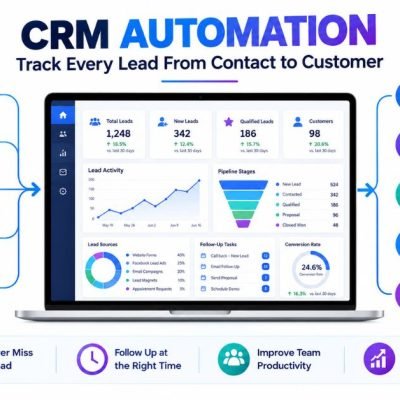
A reliable lead-tracking system should do more than store contact details. It should show where each lead came from, what they have done, how interested they are, and what action should happen next. CRM automation connects these activities so businesses can manage leads without constantly updating records by hand.
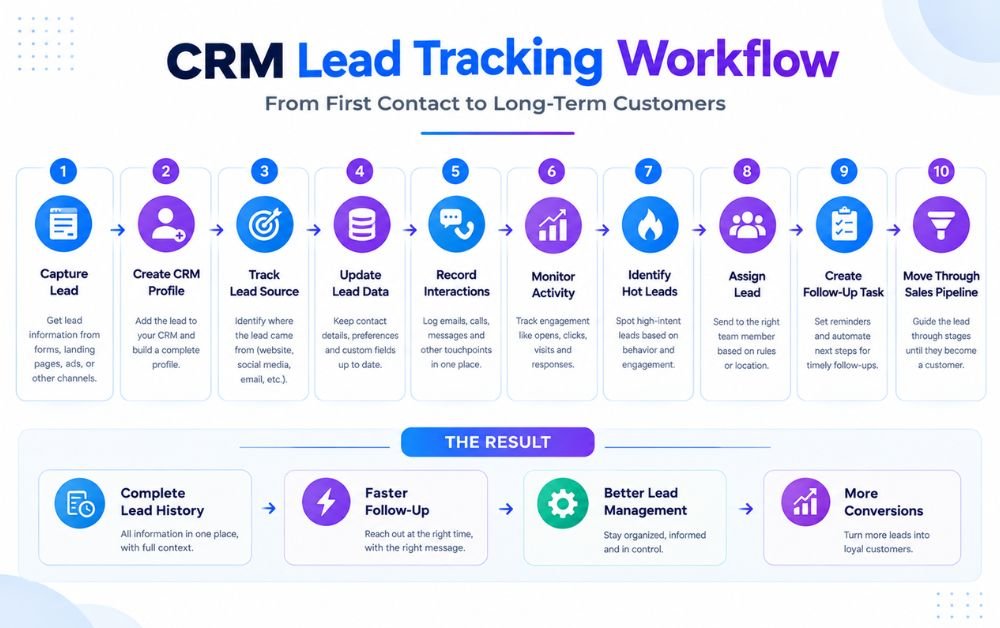
When a new prospect enters through a website form, advertisement, email campaign, or another channel, automation can create a CRM record immediately. From there, the system can capture the lead source, update contact information, record interactions, assign the lead, create follow-up tasks, and move the prospect through the sales pipeline.
This creates a single history for each lead instead of leaving information scattered across different tools. Sales teams can quickly understand a prospect’s journey and respond based on actual activity.
The goal is simple: capture every lead, track every meaningful interaction, and make sure the right action happens at the right time.
Step 1: Bring Leads Into Your CRM Automatically
The first step is making sure new leads enter your CRM without requiring someone to copy and paste their information manually. Leads can come from website forms, landing pages, advertisements, email campaigns, social media, or appointment requests.
Once a prospect submits their information, an automated connection can create a new contact record inside the CRM. Basic details such as name, email address, phone number, form information, and lead source can be transferred automatically.
This removes one of the most common tracking problems: leads sitting outside the CRM while the sales team works from incomplete information.
For example, a business using Lead Capture to CRM Automation can connect its lead forms directly with its CRM and create a record as soon as someone submits their details.
The faster the lead enters the system, the sooner the business can begin tracking and responding.
Step 2: Build a Complete Profile for Every Lead
A CRM record becomes much more useful when it contains more than a name and email address. A complete lead profile gives the sales team enough context to understand who the prospect is and why they may be interested.
Start with essential information such as contact details, company information, location, service interest, and communication preferences. As the lead interacts with the business, additional information can be added to the same record.
Automation can help keep this information organized by updating fields when new forms are submitted, appointments are booked, or other actions occur.
A complete profile prevents salespeople from repeatedly asking for information the business already has. It also makes conversations more relevant because the team can see important details before contacting the prospect.
The objective is to create one reliable customer record instead of scattered notes across different systems.
Step 3: Record the Original Lead Source
Knowing where a lead came from is essential for both sales follow-up and marketing decisions. Without source information, a business may know how many leads it received but not which channels are producing the best opportunities.
CRM automation can record the original source when a prospect enters the system. This might be a website form, Facebook Lead Ad, search campaign, referral, email campaign, landing page, or another channel.
The source can then remain attached to the lead record as the prospect moves through the sales process. This gives the business a clearer picture of which channels generate qualified leads rather than simply producing large numbers of inquiries.
Source tracking also helps prevent guesswork when reviewing marketing performance. Over time, businesses can compare lead quality, sales activity, and conversions across different sources and focus more attention on channels that consistently produce valuable prospects.
Step 4: Keep Lead Information Updated Automatically
Lead information can change as prospects interact with a business. They may submit another form, update their contact details, request a different service, or provide new information during a conversation.
Manually updating every change can become difficult when the lead list grows. CRM automation can reduce this work by updating selected fields whenever a relevant action occurs.
For example, a new form submission could update a service-interest field, while an appointment request could change the lead status. A sales representative can also add important information after a conversation.
Keeping records current helps prevent outdated information from affecting follow-ups. It also gives anyone viewing the CRM a clearer understanding of the prospect’s current situation.
The goal is not to automate every data change blindly. Instead, businesses should create simple rules for important information that needs to stay accurate and useful.
Step 5: Track Every Conversation and Interaction
A lead’s history can include emails, calls, meetings, form submissions, notes, and other interactions. If these activities are recorded separately, salespeople may struggle to understand what has already happened.
A CRM can bring these interactions together under the appropriate lead record. This creates a timeline that shows previous communication and important actions.
For example, a salesperson can see that a prospect submitted a form, received an email, booked a meeting, and later requested more information. That context makes the next conversation more informed.
Automation can also record certain activities without requiring the sales team to update everything manually. This saves time while creating a clearer history.
Tracking interactions is especially useful when more than one person works with the same lead. Anyone taking over the conversation can review the record instead of starting from the beginning.
Step 6: Monitor Lead Activity Across Different Channels
Prospects rarely interact through only one channel. Someone might discover a business through an advertisement, visit its website, open an email, submit a form, and later book an appointment.
Tracking these activities separately can make the customer journey difficult to understand. CRM automation can bring relevant activity into one lead record so the business has a broader view of engagement.
For example, repeated email engagement combined with a recent form submission may indicate that a prospect is becoming more interested. On the other hand, a lead that has stopped interacting may need a different type of follow-up.
The purpose is not to monitor every possible action. Businesses should focus on meaningful activities that help the team understand intent and decide what to do next.
A connected record makes those signals easier to identify and act upon.
Step 7: Identify Leads That Need Immediate Attention
Not every lead requires the same level of attention at the same moment. Some prospects may be highly engaged and ready for a conversation, while others are still researching their options.
CRM automation can help identify leads that deserve faster attention by using clear activity-based rules. For example, a lead that submits a high-intent form, requests pricing information, or books an appointment could trigger an alert for the sales team.
This prevents important signals from being buried among routine contacts.
The key is to keep the rules practical. Too many alerts can create notification fatigue and make genuinely important leads harder to recognize.
A good system highlights meaningful actions and gives the sales team enough context to respond appropriately. Instead of checking every record manually, the team can focus first on prospects showing stronger buying signals.
Step 8: Automatically Assign Leads to the Right Person
Once a lead enters the CRM, someone needs to take responsibility for the next step. If assignment is handled manually, new leads can remain unclaimed or be sent to the wrong salesperson.
Automation can assign leads according to simple rules such as location, service interest, lead source, business size, or sales territory. A lead interested in one service can go to the appropriate specialist, while another prospect can be routed to a different team member.
This creates clearer ownership from the beginning.
Automatic assignment also reduces unnecessary internal communication because the CRM can determine who should handle the lead based on the information already collected.
The process should remain simple enough for the team to understand and review. Clear ownership makes it easier to track response times, follow-up activity, and eventual conversion for every lead.
Step 9: Create Tasks Before Important Follow-Ups Are Missed
A lead can be perfectly organized inside a CRM and still be lost if nobody follows up. Creating tasks automatically helps turn lead information into a specific next action.
For example, when a new lead is assigned, the CRM can create a task to contact them. After a sales call, another task can remind the representative to follow up after an agreed period.
This is useful because salespeople often manage several prospects at different stages. Relying entirely on memory makes missed follow-ups more likely.
Task automation creates a simple structure around the sales process without removing human involvement. The CRM handles reminders and scheduling, while the salesperson handles the actual conversation.
Businesses can also connect this process with automated sales follow-ups so routine communication and manual sales activity work together instead of operating as separate processes.
Step 10: Move Leads Through the Sales Pipeline Automatically
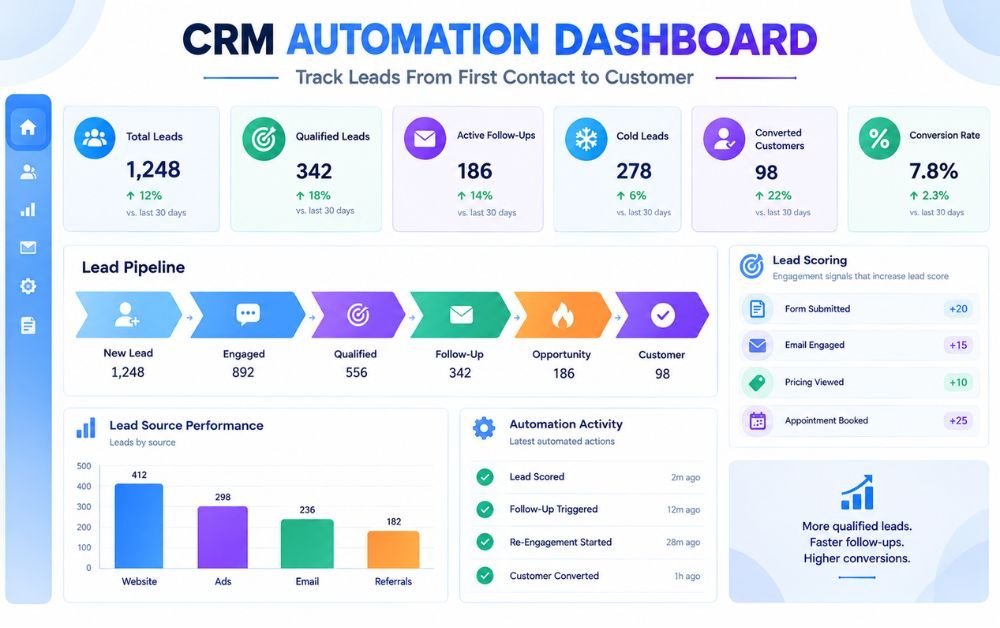
A CRM pipeline gives businesses a visual way to understand where leads are in the sales process. Instead of keeping every contact in one large list, leads can move through stages such as New, Contacted, Qualified, Opportunity, and Customer.
Automation can update certain stages when defined actions occur. For example, a completed appointment could move a lead into a later stage, while a successful qualification process could change the status from new lead to qualified prospect.
Automatic movement should be based on clear conditions rather than assumptions. Human review is still important when a sales decision requires judgment.
When pipeline stages remain accurate, managers can quickly see how many prospects are active, where leads are getting stuck, and which opportunities need attention.
This turns CRM data into a practical view of the entire customer journey.
Step 11: Identify Qualified Leads Using Lead Scoring
Lead scoring helps a business separate highly engaged prospects from people who are only browsing. Instead of treating every contact equally, the CRM can assign points based on useful actions such as submitting a form, opening emails, visiting important pages, requesting pricing, or booking an appointment.
As engagement increases, the lead score can also increase. This gives the sales team a clearer indication of which prospects may deserve attention first.
The scoring system should match the actual buying process. A simple model with a few meaningful signals is usually easier to manage than a complicated system with dozens of rules.
When a lead reaches a defined score, CRM automation can update the lead status or notify the appropriate salesperson. This helps the team spend more time on prospects showing genuine interest instead of manually reviewing every contact.
Step 12: Trigger the Right Follow-Up Based on Lead Behavior
Different leads respond to different situations, so follow-up should reflect what a prospect actually does. A person who requests information may need a quick response, while someone who only downloads a guide may need more educational content first.
CRM automation can trigger actions based on these behaviors. For example, a pricing request could create a sales task, while repeated email engagement could trigger a more relevant follow-up message.
The important part is keeping these workflows useful rather than sending the same message to everyone. Lead behavior provides context that can help determine the next appropriate action.
A business can also connect this process with automated email campaigns to deliver helpful information at the right stage.
The result is a more organized follow-up process where the CRM responds to meaningful actions instead of relying entirely on manual reminders.
Step 13: Re-Engage Leads That Have Gone Cold
Not every lead is ready to buy immediately. Some prospects stop responding because their priorities change, they become busy, or they simply need more time before making a decision. That does not necessarily mean the opportunity is permanently lost.
A CRM can identify inactive leads based on a defined period without meaningful activity. Once a lead reaches that condition, an automated re-engagement workflow can send a useful message or create a task for a salesperson.
The message should give the prospect a reason to return rather than repeatedly asking for a sale. A helpful resource, relevant update, or simple check-in may be more appropriate.
If the lead responds, the CRM can return them to an active follow-up process. If there is still no engagement, the business can leave the contact in a low-priority segment rather than continuously contacting them.
Step 14: Track the Complete Journey From Lead to Customer
The real value of lead tracking appears when the CRM records the complete journey rather than stopping after the first contact. A useful timeline can show when the lead entered the system, where they came from, what they interacted with, how they were qualified, and which follow-ups occurred.
As the prospect moves through the pipeline, these activities build a clearer picture of the customer journey. Sales teams can quickly review previous conversations instead of asking the same questions again.
This history is also helpful when a different salesperson takes over the account. The new team member can understand the lead’s situation without starting from zero.
With Lead Capture to CRM Automation, the journey can begin automatically when the prospect first submits their information and continue as new interactions are recorded.
The result is one connected record from first contact through conversion.
Step 15: Measure Which Leads and Sources Actually Convert
Tracking lead volume alone does not tell you whether your marketing and sales process is working. A business also needs to understand which leads become customers and where those leads originally came from.
CRM reporting can connect lead sources with pipeline stages and final conversions. This allows businesses to compare results from channels such as website forms, advertisements, referrals, email, or social media.
For example, one source may generate many inquiries but very few customers, while another produces fewer leads with a much higher conversion rate. Without proper tracking, that difference can easily be missed.
Regularly reviewing these numbers helps businesses make better decisions about where to focus their time and budget.
The goal is not simply to collect more leads. It is to understand which leads are actually becoming customers and improve the process around those opportunities.
Common CRM Automation Mistakes That Cause Leads to Get Lost
CRM automation can save time, but a poorly planned workflow can create new problems. One common mistake is connecting a lead source without checking whether all important contact fields are being transferred correctly. Missing names, phone numbers, or source information can make follow-up difficult.
Another problem is creating too many automated rules. When several workflows update the same lead, records can become confusing or trigger duplicate messages. Businesses should also avoid relying completely on automation for decisions that require human judgment.
Ignoring inactive leads is another missed opportunity. A lead that stops responding should not simply disappear from the pipeline. A simple re-engagement process can help identify whether the prospect is still interested.
Finally, businesses should regularly check their CRM data. Lead tracking only works when records remain accurate, statuses are meaningful, and follow-up tasks are actually being completed.
A reliable system should make the sales process clearer, not more complicated.
Best Practices for Building a Reliable CRM Automation System
Start with a simple workflow that reflects how your business actually handles leads. Define where leads come from, what information should be stored, who owns each lead, and which actions should happen at every stage.
Use clear pipeline stages so everyone understands whether a lead is new, contacted, qualified, or ready for a sales conversation. Keep automated rules focused on useful actions such as assigning leads, creating tasks, recording activities, and triggering relevant follow-ups.
Regularly review your CRM automation system to make sure workflows are still working as expected. Test new forms and integrations before sending real leads through them. Check that contact details, lead sources, tags, and status changes are being recorded correctly.
It is also important to keep human involvement where it matters. Automation can handle repetitive work, but salespeople should still make important decisions and have genuine conversations with prospects.
The best system is not the most complicated one. It is the one that reliably keeps every lead organized and moving toward the next appropriate step.
Final Verdict
A growing lead list becomes much easier to manage when every prospect has a clear record, source, activity history, follow-up plan, and pipeline stage. CRM automation brings these pieces together and reduces the manual work that often causes leads to be forgotten.
The goal is not to automate every part of selling. Instead, automation should handle repetitive tracking tasks while your team focuses on conversations, qualification, and closing opportunities.
Start with a simple workflow, test each step, and improve it as your business grows. When lead information stays organized and follow-ups happen consistently, your CRM becomes more than a database—it becomes a practical system for managing the entire customer journey.
FAQs
CRM automation uses predefined workflows to capture, organize, update, and track leads without requiring every action to be completed manually. It can also create tasks, assign leads, and trigger follow-ups.
Yes. A CRM can record the original lead source when a prospect enters the system. This can help businesses understand which channels generate leads and which sources eventually produce customers.
Automation can create follow-up tasks, assign leads to team members, and trigger notifications when important actions occur. This gives the sales team a clearer view of which leads need attention.
Yes. Depending on the CRM and integrations being used, lead records can contain activities such as emails, calls, form submissions, appointments, and other interactions. This creates a more complete history for each prospect.
Yes. Small businesses can start with simple workflows for lead capture, assignment, follow-up reminders, and pipeline management. As the lead volume grows, additional automation can be introduced where it provides genuine value.